Harry Potter Collection (single covers)


Fidi wrote:QUOTE (Fidi @ Jun 10 2018, 04:19 PM) <{POST_SNAPBACK}>Yes and I'm still looking for a hand for Ron as well.
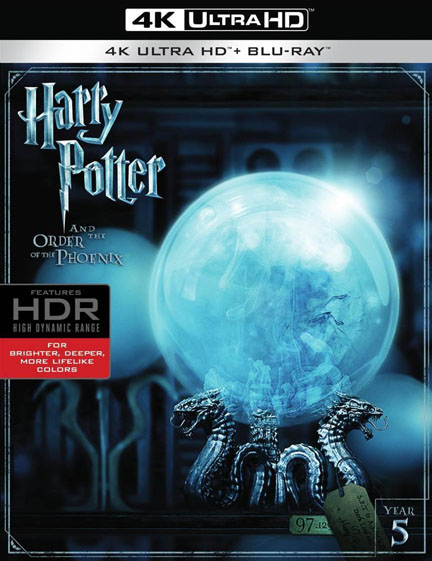
If i my suggest something. Have You thought about using prophecy instead of this piece of paper (next to Harry)?
F.E.:
-
Fidi

- HiRes Uber Member
- Posts: 3117
- Joined: Thu Jun 13, 2013 6:07 am
- Location: Ansbach, Germany
- Contact:
rajd3r wrote:QUOTE (rajd3r @ Jun 10 2018, 06:31 PM) <{POST_SNAPBACK}>Have You thought about using prophecy instead of this piece of paper (next to Harry)?
Yes I thought about that and it would make sence of course. But because of optical reasons (in the end it's only a ball ^^) I decided to go with the list (Dumbledore's army list, which is an important part of the movie as well). And I'll use the prophecy on the back image so it will be on the cover at least.My MD Gallery


-
Fidi
- HiRes Uber Member
- Posts: 3117
- Joined: Thu Jun 13, 2013 6:07 am
- Location: Ansbach, Germany
- Contact:
Before I use the filters on every character, I did a lot of retouching original images (especially on Ron) and adjustments of the colors, new coloring highlights etc. to get them look as similar as possible on each front. Then I made a copy of the group, merged the copy to one layer and made four more copies of this layer (a total of five copies, the original group is deactivated). From the bottom up:
- #1 is Topaz Clean filter with the presets of "Curly Smooth" (layer on normal, opacity 100%)
- #2 is Topas Adjust - Vibrant Collection with the presets "Clarity" (layer on normal, opacity 50%)
- #3 is Akvis HDR with settings 65, 100, 25, 40, 10, 2, 2 (layer on colour, opacity 100% and as clipping mask: -25 saturation & photofilter with 50% aa9476)
-# 4 is Akvis Sketch (style: classic) with 45, 2, 10 to 30, 4, 85 (layer on luminosity, opacity 20%)
-# 5 is a High Pass filter with 5px (layer on softlight, opacity 75%)
Settings for #4 and opacity for #1 depent on the original image quality, the smaller the image the less I use the filter, #3 is to get the colors as they are now.
- #1 is Topaz Clean filter with the presets of "Curly Smooth" (layer on normal, opacity 100%)
- #2 is Topas Adjust - Vibrant Collection with the presets "Clarity" (layer on normal, opacity 50%)
- #3 is Akvis HDR with settings 65, 100, 25, 40, 10, 2, 2 (layer on colour, opacity 100% and as clipping mask: -25 saturation & photofilter with 50% aa9476)
-# 4 is Akvis Sketch (style: classic) with 45, 2, 10 to 30, 4, 85 (layer on luminosity, opacity 20%)
-# 5 is a High Pass filter with 5px (layer on softlight, opacity 75%)
Settings for #4 and opacity for #1 depent on the original image quality, the smaller the image the less I use the filter, #3 is to get the colors as they are now.
Last edited by Fidi on Mon Jun 11, 2018 4:56 am, edited 1 time in total.
My MD Gallery

 .
.Fidi wrote:QUOTE (Fidi @ Jun 10 2018, 09:55 PM) <{POST_SNAPBACK}>Before I use the filters on every character, I did a lot of retouching original images (especially on Ron) and adjustments of the colors, new coloring highlights etc. to get them look as similar as possible on each front. Then I made a copy of the group, merged the copy to one layer and made four more copies of this layer (a total of five copies, the original group is deactivated). From the bottom up:
- #1 is Topaz Clean filter with the presets of "Curly Smooth" (layer on normal, opacity 100%)
- #2 is Topas Adjust - Vibrant Collection with the presets "Clarity" (layer on normal, opacity 50%)
- #3 is Akvis HDR with settings 65, 100, 25, 40, 10, 2, 2 (layer on colour, opacity 100% and as clipping mask: -25 saturation & photofilter with 50% aa9476)
-# 4 is Akvis Sketch (style: classic) with 45, 2, 10 to 30, 4, 85 (layer on luminosity, opacity 20%)
-# 5 is a High Pass filter with 5px (layer on softlight, opacity 75%)
Settings for #4 and opacity for #1 depent on the original image quality, the smaller the image the less I use the filter, #3 is to get the colors as they are now.
Thx buddy !
-
Fidi
- HiRes Uber Member
- Posts: 3117
- Joined: Thu Jun 13, 2013 6:07 am
- Location: Ansbach, Germany
- Contact:
Went on to the back of #5 instead of going on to #6. ^^
It's only about the big image on the top left, please ignore the rest.
Not sure if I should move it down a bit so the crossing to the bright background works better behind the quote?
[attachment=39254:Preview.jpg]
It's only about the big image on the top left, please ignore the rest.
Not sure if I should move it down a bit so the crossing to the bright background works better behind the quote?
[attachment=39254:Preview.jpg]
You do not have the required permissions to view the files attached to this post.
My MD Gallery
Who is online
Users browsing this forum: No registered users and 2 guests
- Menu
- Search the site
- Latest gallery additions
- Statistics
- Totals
Total posts 207052
Total topics 58499
Total Announcements: 0
Total Stickies: 80
Total Attachments: 26728
Topics per day: 8
Posts per day: 28
Users per day: 13
Topics per user: 1
Posts per user: 2
Posts per topic: 4
Total members 92764
Our newest member montanelas
- The team
- Administrators
Ace
bazzah
ctaulbee
iHTTP-Steven
Moderators
BajeeZa
Jazzy
ripley
sauron
Speedz0r
VincentLupo