
hi guys & gals
i have a problem i was wondering if anyone could help when i print a cover i would use nero cover designer to print the cover does anyone know of any programmes to print dvd covers or can i do it through adobe cs4 please help.
dvd cover printing software
-
ulookingatme

- Valued Member
- Posts: 128
- Joined: Mon Jun 19, 2006 7:47 pm
- Location: London U.K
- Contact:
You can either just use the File> Print function in cs4 or i tend to use this freeware program Undercoverxp http://members.upc.nl/e.heesakkers3/undercoverxp/ great little proggy that has all the templates pre-loaded 
Last edited by ulookingatme on Sat Nov 06, 2010 10:57 pm, edited 1 time in total.


I don't really see the need for special printing software, all you need is to print at 100%; no scaling. Pretty sure all image handlers can do that, and if you have Photoshop then you can definitely do it.
My covers may only be viewed on well calibrated screens and printed on well calibrated printers.

-
JollyRoger

- HiRes Uber Member
- Posts: 13911
- Joined: Thu Aug 16, 2007 11:43 pm
- Location: Denmark
- Contact:
I used to use some silly proggie to print out covers (no, not UndercoverXP), until a friend told me to just hit PRINT from inside PS. Works on the PC - and works on the Mac.
Why you cannot print directly from PS is beyond me joe - but you must have screwed up some settings.... Give me a huller, and I'll try and help you via via MSN/Skype..
Why you cannot print directly from PS is beyond me joe - but you must have screwed up some settings.... Give me a huller, and I'll try and help you via via MSN/Skype..
A designer knows he has achieved perfection - not when there's nothing left to add - but when there's nothing left to take away
- Antoine de Saint Exupéry

SITE RULES
- Antoine de Saint Exupéry
SITE RULES
-
bluesnow

- Valued Member
- Posts: 188
- Joined: Sun May 14, 2006 1:36 pm
- Location: Ontario, Canada
- Contact:
I print from SC4 but I use 8 1/2 X 11 paper so I used to get a message saying the print will be clipped. What I have to do is tell the print driver I'm using A4 sized paper instead (but still loading the 8 1/2 X 11), then in the print dialogue box I set the cover to start at the very top edge of the paper. The driver thinks I'm using a long enough sheet of paper and sure enough, the cover finishes printing before the paper runs out. It all depends on the print margins built into your printer.

Bletch wrote:QUOTE (Bletch @ Nov 22 2010, 11:41 AM) <{POST_SNAPBACK}>How do i print directly from CS4 ? I've tried but the the print covers all of the paper when in the preview.
Is there a guide here for doing so ?
Wow, many people experience difficulties when printing from Photoshop. I hope this works out for you:
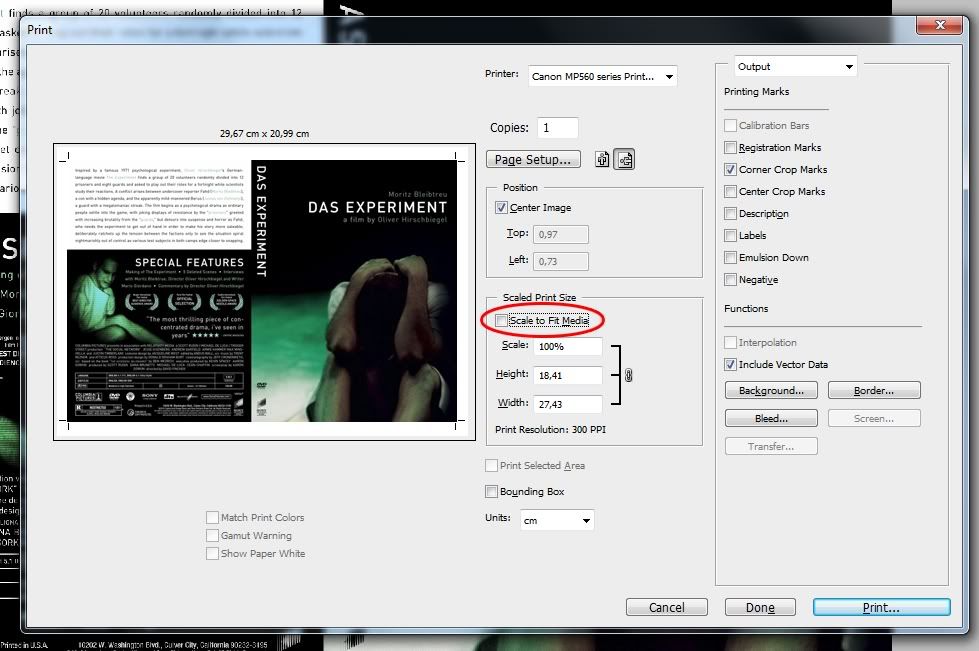
It's possible that the checkbox "Scale to fit media" is checked in the Print Dialog, which should be unchecked
Another possibility is that the resolution of the cover is set to 72 DPI, where this should be 300 DPI. To check this, press ' ALT + CTRL + I ' (when viewing the cover) and you'll get an image size dialog,
then make sure 'resample image' is switched off and replace 72 with 300 (pixels/inch), like you see below:

Who is online
Users browsing this forum: No registered users and 3 guests